Employability
4 min read
What Paper Size Should You Use for Your Resume in 2026?
Synopsis
Learn about resume paper size for the U.S., Canada, and international markets, when to use A4 vs Letter, and the ideal CV size in inches so your document prints cleanly and looks professional.
Key Insight
Most resume formatting issues happen before content is reviewed. Using the correct page size ensures your resume displays cleanly across ATS systems and hiring platforms.
Choosing the right resume paper size might seem like a small detail, but it plays a bigger role in hiring than most people realize. Using the wrong size can affect how your resume appears on screen, how it prints, and how applicant tracking systems read your file.
This guide explains which resume size to use, why it matters, and how to choose the correct format for your region and career stage.
Hint
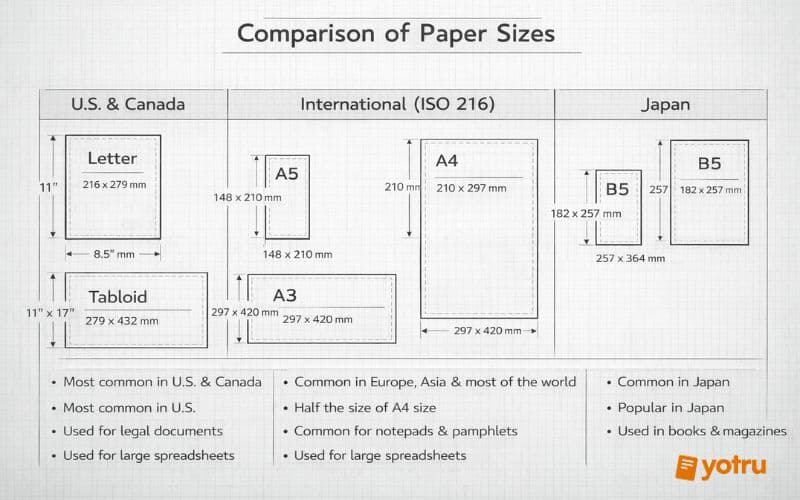
The standard resume paper size is Letter (8.5 × 11 inches) in the U.S. and Canada and A4 (8.27 × 11.69 inches) in most other countries.
Resume Paper Size: The Standard Formats
There are two main paper sizes used for resumes worldwide. Choosing the correct one depends on where you are applying.
Letter Size (8.5 × 11 inches)
Letter size is the standard in:
- United States
- Canada
- Parts of Latin America
Most employers and ATS systems in these regions expect resumes in this format. Using a different size can cause layout issues or unexpected formatting changes.
A4 Size (210 × 297 mm)
A4 is the standard in:
- Europe
- United Kingdom
- Australia
- Asia
- Most international markets
If you are applying outside North America, A4 is usually the correct and expected choice.
What Paper Size Should a Resume Be?
If you are applying in North America, use Letter (8.5 × 11 inches).
If you are applying internationally, use A4 (210 × 297 mm).
This simple choice helps your resume display correctly in applicant tracking systems, PDF viewers, and print formats. Using the wrong size can cause clipped margins, uneven spacing, or content being pushed onto extra pages.
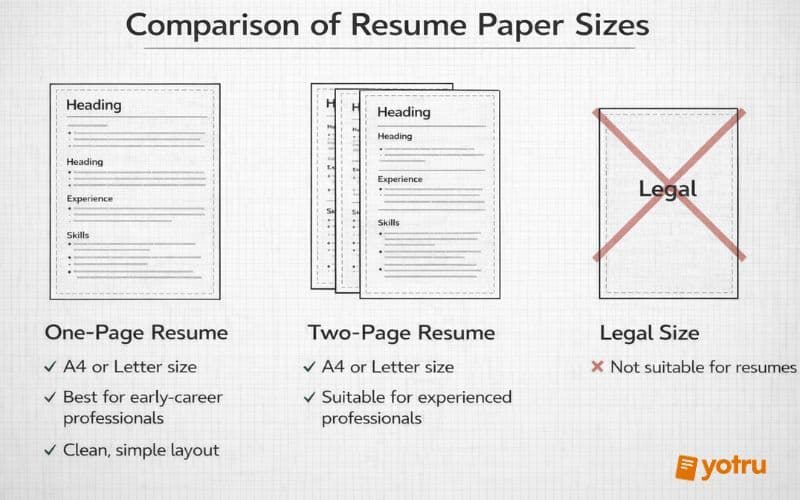
Resume Page Size and Length
Page size and resume length are related but not the same thing.
One-Page Resume
Best for:
- Students and recent graduates
- Early career professionals
- Career changers with limited experience
Use one page if you can clearly present your experience without overcrowding the layout.
Two-Page Resume
Appropriate for:
- Professionals with 7+ years of experience
- Technical, managerial, or specialized roles
- Candidates with certifications or project-based work
If you need two pages, use the correct paper size and allow natural spacing. Do not shrink text or margins to force content onto one page.
Pro Tip
If your resume looks different on mobile than desktop, it likely has spacing or sizing issues. Always preview your file on multiple devices before submitting. I
Resume Size for Digital Applications
Most resumes today are reviewed digitally before they are ever printed. Because of this, formatting consistency is critical.
Best practices for digital resumes:
- Save your resume as a PDF
- Use a single column layout
- Avoid tables, text boxes, and graphics
- Keep margins at 0.5 inches or larger
- Test how your resume looks on desktop and mobile
Hint
Applicant Tracking Systems rely on predictable formatting. Using standard page sizes improves readability and parsing accuracy.
Why PDF Is the Best Format for Your Resume
Saving your resume as a PDF is one of the simplest ways to protect your formatting. Unlike Word or other editable files, PDFs preserve layout, spacing, fonts, and alignment across all devices and operating systems.
When you submit a PDF, recruiters see your resume exactly as you intended. It prevents unexpected line breaks, shifted margins, or font substitutions that can occur when a file is opened in different software.
PDFs are also more compatible with modern applicant tracking systems. They maintain structure while remaining easy for systems to scan and parse. This makes them the safest and most professional format for job applications.
Important
Always submit your resume as a PDF unless an employer specifically requests a different format. PDFs preserve formatting and display consistently across all systems.
Resume Paper Size and Printing
If you plan to bring printed copies to an interview:
- Use white or off-white paper
- Choose 24 lb or 32 lb paper for durability
- Print using the correct regional size
- Avoid glossy or textured paper
Professional presentation still matters, especially in in-person interviews or formal hiring processes.
Common Resume Size Mistakes to Avoid
- Using A4 when applying to U.S. companies
- Shrinking margins to fit more text
- Mixing page sizes in one document
- Using custom or non-standard dimensions
- Exporting resumes as images instead of PDFs
These issues can make an otherwise strong resume look unprofessional or cause formatting errors during screening.
Key Takeaways
- Use Letter (8.5 × 11) for the U.S. and Canada
- Use A4 (210 × 297 mm) for Europe and most other regions
- Keep layouts simple and readable
- Save resumes as PDFs for consistent formatting
- Match your resume size to the region you are applying in
How Yotru Makes This Easy
Yotru removes the complexity from resume formatting by using a standardized layout that works seamlessly across screens, devices, and printing formats. Instead of worrying about paper sizes or technical settings, Yotru automatically formats your resume in a way that displays correctly everywhere, whether viewed digitally or printed.
The focus stays where it should be: on your story. Yotru’s guided approach helps you shape your experience, achievements, and skills into a clear, professional narrative while the system handles layout, spacing, and structure behind the scenes.
The result is a resume that is clean, consistent, and ATS-friendly, while still reading naturally to human recruiters. You get a polished, professional document without needing to think about formatting rules or technical details.
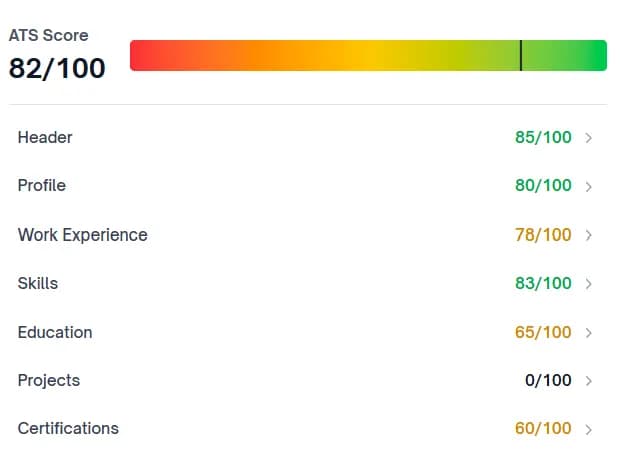
ATS-Optimized resumes That Meet Employer Standards
Our AI-powered scoring system helps organizations assess and standardize resume quality at scale. ATS-compliant templates support consistent formatting, keyword alignment, and interview readiness across cohorts.
About the Author

Team Yotru
Employability Systems
Team Yotru
Employability Systems
We build practical career tools for training providers and workforce programs, combining labor market insights with real employment outcomes. Follow us on LinkedIn.
Frequently Asked Questions
In the United States and Canada, use Letter size which is 8.5 × 11 inches. In Europe, UK, Australia, and most other countries, use A4 size which is 210 × 297 mm or 8.27 × 11.69 inches. Digital resumes should be saved as PDFs in the appropriate size for your target job market.
Audience Context
This article is intended for job seekers, career changers, and professionals preparing resumes for roles in different regions. The guidance reflects current hiring standards, applicant tracking system behavior, and common formatting practices used by employers worldwide. While every organization may have specific preferences, the recommendations here are designed to help candidates present their experience clearly, professionally, and in a format that works across modern hiring systems.
Research Methodology
This article is based on a review of current hiring practices, applicant tracking system (ATS) behavior, and formatting standards used by employers across North America, Europe, and other major job markets. It incorporates guidance from recruitment professionals, resume screening research, and platform-specific formatting requirements to reflect how resumes are reviewed in real hiring workflows.
Disclaimer
This content is provided for general informational purposes only and does not constitute legal, career, or professional advice. Hiring practices may vary by employer, industry, and region. Readers should verify requirements with specific employers or consult qualified career professionals when making decisions related to resume formatting or job applications.
Further Insights
Resume optimization links
- Make Your Resume ATS‑Friendly in 5 Minutes (2026 Guide) – Learn how resume paper size, layout, and keywords affect ATS scores and recruiter readability.
- Resume Length: Should It Be One Page or Two Pages? – Decide whether to keep your resume to a single Letter/A4 page or expand to two pages without hurting readability.
- The Myth of Single‑Column vs Double‑Column Resumes for ATS – See how column choices interact with standard resume page sizes and ATS parsing.
- 7 Traits All Great Resumes Possess – Connect paper size and formatting choices to the content traits employers actually notice.
Yotru tools links
- Resume Builder – Automatically applies the correct A4 or Letter page size for your target job market.
- Resume Templates – ATS‑ready templates pre‑formatted to standard resume paper dimensions.
- Cover Letter Builder – Match your cover letter page size and formatting to your resume for a consistent application.
Applicant Tracking Systems and resume formatting
- University of Pittsburgh Career Central. (2025). CV vs. resume considerations: Understanding applicant tracking systems. Retrieved from https://careercentral.pitt.edu/resources/applicant-tracking-systems-ats-effective-resume-writing/
- University of Illinois Chicago Office of Career Services. (n.d.). Optimizing resumes for applicant tracking systems. Chicago: UIC Career Services.
- University at Buffalo School of Management. (n.d.). ATS‑friendly résumés: Understanding electronic screening systems. Buffalo: UB Career Resource Center.
Resume best practices and standards
- Texas A&M University Career Center. (n.d.). Resume formatting: Professional standards and guidelines. College Station: Texas A&M Career Center. Retrieved from https://careercenter.tamu.edu/former-students/resume-and-cover-letters/resume-formatting
Document formatting and academic standards
- Modern Language Association. (n.d.). MLA Handbook (9th ed.). New York: Modern Language Association of America.
- The University of Chicago Press. (2017). The Chicago Manual of Style (17th ed.). Chicago: University of Chicago Press.
- Boston College Libraries. (n.d.). Formatting your paper: Guidelines for academic papers at the Carroll School of Management. Chestnut Hill: BC Libraries.
- University of Windsor Career Centre. (2020). How employers see your resume: Eye‑tracking research and digital viewing patterns. Windsor: University of Windsor.
Maintained by: Employability & Skills Group at Yotru
Review cycle: Regularly reviewed to reflect real-world practice
Last updated: January 5, 2026
Questions or Need Support?
If you are working on employability programs, hiring strategy, career education, or workforce outcomes and want practical guidance, you are in the right place.
Yotru supports individuals and organizations navigating real hiring systems. That includes resumes and ATS screening, career readiness, program design, evidence collection, and alignment with employer expectations. We work across education, training, public sector, and industry to turn guidance into outcomes that actually hold up in practice.